Epics
Epics are large bodies of work that span multiple sprints. They group related tasks under a single theme or initiative — like “User Onboarding Redesign” or “Payment Gateway Integration” — so you can track progress on big-picture goals without losing sight of the individual pieces.
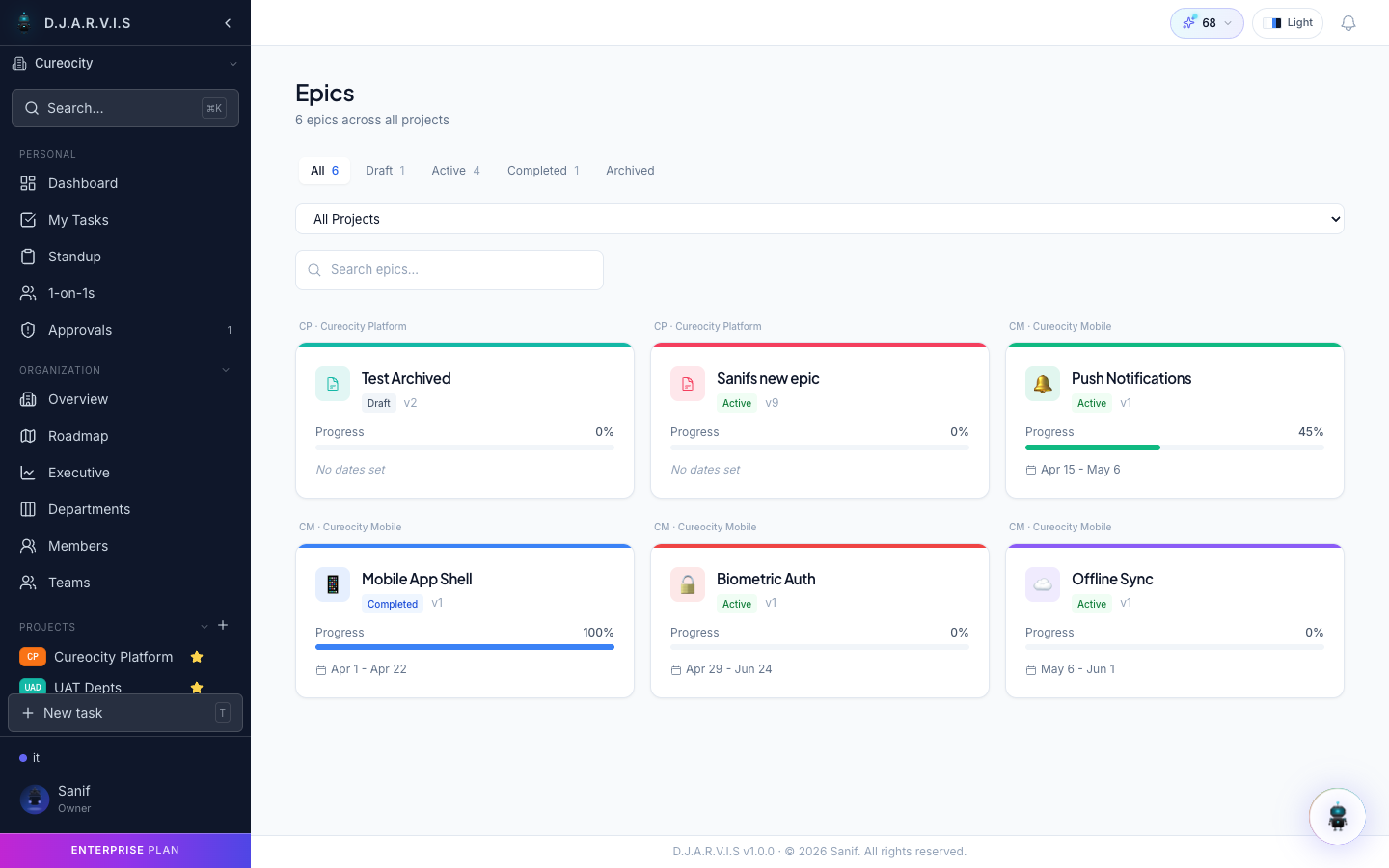
Epics List Page
Every project has an Epics page accessible from the sidebar. It shows all epics for that project with key details at a glance:
- Epic name and description.
- Status — the current lifecycle stage.
- Progress — a completion bar based on linked tasks.
- Date range — planned start and end dates.
- Task count — how many tasks are linked to the epic and how many are done.
Click any epic to open its detail view, where you can see the full task breakdown and manage dependencies.
Creating an Epic
To create an epic, navigate to the Epics page and click Create Epic. You’ll provide:
- Name — a clear label for the initiative (e.g., “Mobile App Launch” or “RBAC Overhaul”).
- Description — a longer explanation of the epic’s scope and objectives. This helps team members understand the “why” behind the work.
- Status — the initial lifecycle stage (typically starts as To Do).
- Start date and End date — the planned timeline for the epic. These are estimates and can be adjusted as the work progresses.
Epics are project-scoped, meaning each epic belongs to a single project. However, epics from different projects can be pinned to the organization-wide roadmap for cross-project visibility.
Linking Tasks to Epics
Tasks are the building blocks of an epic. To link a task to an epic:
- Open the task.
- Set the Epic field to the target epic.
- Save.
You can also link tasks when creating them — the epic field is available in the task creation form. A task can belong to only one epic at a time.
From the epic detail view, you can see all linked tasks grouped by status, making it easy to spot bottlenecks or areas that need attention.
Epic Progress
Epic progress is calculated automatically based on its linked tasks. The detail view shows:
- Completion percentage — the ratio of completed tasks to total tasks.
- Progress bar — a visual indicator that fills as tasks are closed.
- Task breakdown — counts of tasks in each status (To Do, In Progress, Done, etc.).
- Story points — if your tasks use story points, the epic also shows points completed versus total.
Progress updates in real time as tasks move through their workflow. This gives stakeholders a reliable view of how close the initiative is to completion without needing to check individual tasks.
Epic Dependencies
Large initiatives often depend on each other. Takonaut lets you define dependencies between epics to make these relationships explicit.
To add a dependency:
- Open an epic.
- Navigate to the Dependencies section.
- Click Add Dependency and select the epic that must be completed first.
Dependencies are directional — “Epic A depends on Epic B” means Epic B should be completed before Epic A can proceed. The system tracks these relationships and surfaces them on the roadmap so teams can plan sequencing accordingly.
You can also remove dependencies when priorities change or the relationship no longer applies.
Epic Statuses
Epics move through a lifecycle represented by statuses:
| Status | Meaning |
|---|---|
| To Do | The epic has been defined but work hasn’t started. |
| In Progress | At least some tasks are actively being worked on. |
| Done | All linked tasks are complete and the initiative is finished. |
These statuses help teams and stakeholders quickly understand where each initiative stands without diving into task-level details.
Pin to Roadmap
When an epic represents a strategic initiative that stakeholders across the organization should see, you can pin it to the roadmap. This promotes the epic from the project level to the organization-wide roadmap.
To pin an epic:
- Open the epic detail view.
- Click Pin to Roadmap.
The epic will now appear on the Roadmap page alongside other pinned epics from across the organization. Unpinning removes it from the roadmap but does not delete the epic or affect its tasks.