Quests
Quests are structured challenges that reward you with XP and coins for achieving specific goals. They range from org-wide initiatives to personal productivity targets, giving everyone something to strive for beyond their regular tasks.
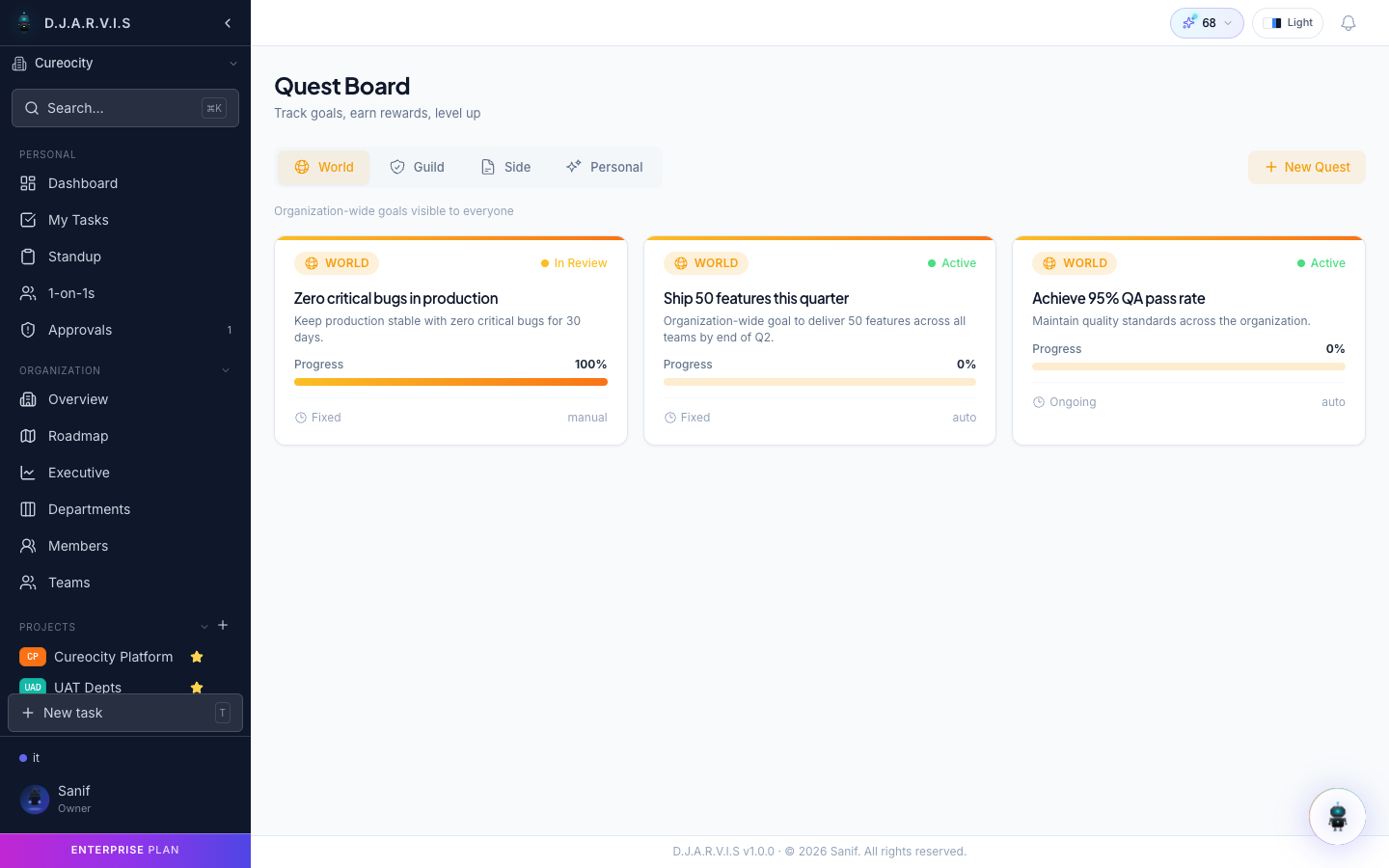
How quests work
A quest defines a goal, a set of conditions to meet, and a reward for completion. You browse available quests on the quest board, accept the ones that interest you, track your progress, and submit them for review when complete. Once a reviewer approves your submission, you receive the reward.
Quest types
Quests are categorized by scope, determining who can participate and who creates them:
| Type | Scope | Description |
|---|---|---|
| World | Organization-wide | Available to everyone in the org. Often tied to company-wide goals like shipping a release or hitting an OKR. |
| Guild | Team | Scoped to a specific team. Encourages team-level collaboration and friendly competition between teams. |
| Side | Open | Optional challenges that anyone can pick up. Good for cross-functional work or learning goals. |
| Personal | Individual | Assigned to or created by a single person. Great for personal development targets. |
Auto quests
The system automatically generates quests based on activity patterns and sprint cycles. Examples include:
- “Complete 5 tasks this sprint”
- “Submit standups for 5 consecutive days”
- “Close all your In Progress tasks before sprint end”
Auto quests appear on the quest board alongside manual quests. They are refreshed each sprint to keep challenges relevant and timely.
Manual quests
Managers and admins can create custom quests tailored to their team’s goals. When creating a manual quest you define:
| Field | Description |
|---|---|
| Title | A short name for the quest. |
| Description | What the participant needs to accomplish. |
| Type | World, Guild, Side, or Personal. |
| XP reward | How much XP the participant earns on completion. |
| Coin reward | How many coins the participant earns on completion. |
| Deadline | Optional due date for the quest. |
| Assignees | Who can or must participate (depends on quest type). |
Manual quests give managers a flexible tool to incentivize specific behaviors, celebrate milestones, or drive focus during critical periods.
Quest board
The quest board is your hub for discovering and managing quests. Open it from Rewards > Quests in the sidebar. The board shows:
- Available quests — quests you can accept.
- Active quests — quests you have accepted and are working on.
- Completed quests — quests you have finished, with their reward status.
Each quest card displays the title, type badge, reward amounts, deadline (if any), and current progress.
Accepting quests
To take on a quest, click on it from the quest board and select Accept Quest. The quest moves from Available to Active and you can begin working toward its goal. You can have multiple active quests at the same time.
Some quests are auto-accepted — for example, Personal quests assigned to you by a manager are active from the moment they are created.
Quest progress
As you work, quest progress updates automatically based on the conditions defined in the quest. For example, a quest to “Complete 5 tasks this sprint” tracks your task completions in real time and shows a progress bar (e.g., 3/5 complete).
You can check your progress at any time by opening the quest from the Active section of the quest board.
Quest review
When you have met the conditions of a quest, you submit it for review. The review process works as follows:
- Submit for review — you mark the quest as complete and submit it.
- Manager review — the quest reviewer (typically your manager or the quest creator) evaluates whether the conditions have been met.
- Approved — the reviewer confirms completion. XP and coins are awarded to your account.
- Rejected — the reviewer determines the conditions have not been fully met. You can continue working and resubmit.
For auto quests with objectively measurable conditions, the review step may be skipped and rewards are granted automatically.
Quest RBAC
Quest permissions are controlled by a role-based access matrix that determines who can create, assign, review, and manage quests:
| Action | Who can do it |
|---|---|
| Create World quests | Organization admins |
| Create Guild quests | Team leads and managers |
| Create Side quests | Managers and admins |
| Create Personal quests | Managers (for their reports) and the individual themselves |
| Review quest submissions | The quest creator, the participant’s manager, or an admin |
| Assign quests | Quest creators and admins |
This permission model ensures quests are created and reviewed by people with the appropriate context and authority. Organization admins can adjust these permissions in the quest RBAC settings to fit their team’s workflow.