Roles & Permissions
Takonaut uses Role-Based Access Control (RBAC) to manage what each user can see and do. Permissions are assigned through roles, and roles can be scoped to different levels of your organization.
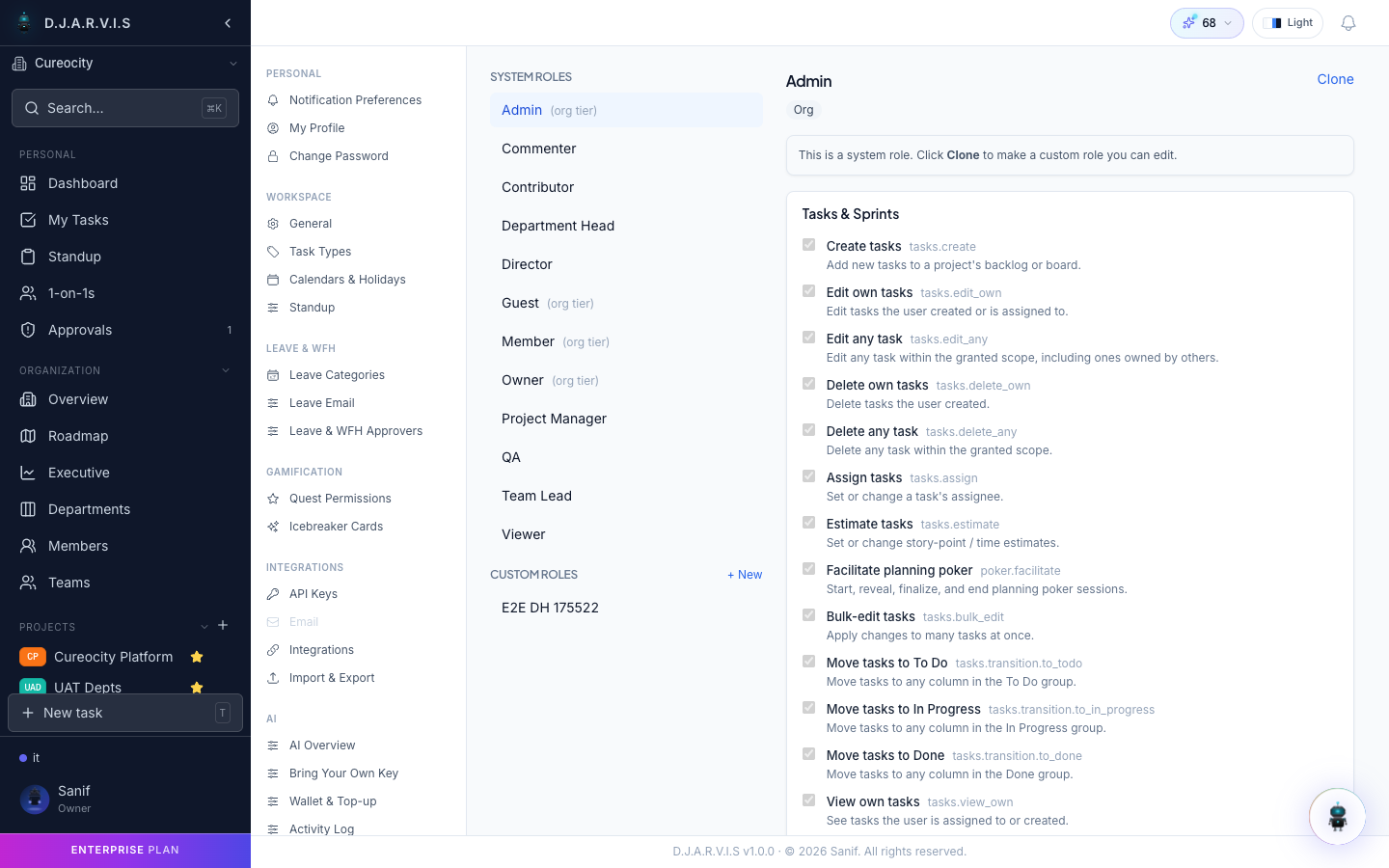
Built-in roles
The system ships with a set of predefined roles that cover common organizational structures:
| Role | Description |
|---|---|
| Owner | Full control over the organization. Can manage billing, delete the org, and assign any role. |
| Admin | Broad administrative access. Can manage members, projects, settings, and most org-wide configurations. |
| Department Head | Manages a specific department — members, projects, and team structure within that department. |
| Project Manager | Controls project-level settings, sprints, and task management for assigned projects. |
| Team Lead | Leads a team within a project or department. Can manage team members and oversee task assignments. |
| Member | Standard user. Can create and manage their own tasks, submit standups, and participate in sprints. |
| Contributor | Limited access. Can view and update tasks assigned to them but cannot create new tasks or manage sprints. |
| Guest | Read-only access to specific projects they’ve been invited to. |
| QA | Quality assurance role. Can move tasks through testing stages and flag issues. |
| Delivery Manager | Oversees delivery metrics, sprint health, and team performance. Has access to reporting and analytics. |
Permission matrix
Each role comes with a specific set of permissions. Here are the key permission categories:
Tasks & Sprints
| Permission | Owner | Admin | PM | Team Lead | Member | Contributor | Guest |
|---|---|---|---|---|---|---|---|
| Create tasks | Yes | Yes | Yes | Yes | Yes | No | No |
| Edit any task | Yes | Yes | Yes | Yes | No | No | No |
| Edit own tasks | Yes | Yes | Yes | Yes | Yes | Yes | No |
| Delete tasks | Yes | Yes | Yes | No | No | No | No |
| Move tasks between statuses | Yes | Yes | Yes | Yes | Yes | Yes | No |
| Manage sprints | Yes | Yes | Yes | Yes | No | No | No |
| Bulk actions | Yes | Yes | Yes | Yes | No | No | No |
Organization
| Permission | Owner | Admin | DH | PM | Team Lead | Member |
|---|---|---|---|---|---|---|
| Manage members | Yes | Yes | Dept only | No | No | No |
| Manage departments | Yes | Yes | Own dept | No | No | No |
| Manage roles | Yes | Yes | No | No | No | No |
| View analytics | Yes | Yes | Yes | Yes | Yes | No |
| Manage settings | Yes | Yes | No | No | No | No |
Gamification
| Permission | Owner | Admin | DM | Others |
|---|---|---|---|---|
| Grant coins | Yes | Yes | Budget only | No |
| Grant XP | Yes | Yes | No | No |
| Manage bounties | Yes | Yes | Yes | No |
| Manage shop | Yes | Yes | No | No |
Custom roles
If the built-in roles don’t fit your organization, you can create custom roles:
- Go to Settings > Roles & Permissions.
- Click Create Role.
- Name the role and optionally provide a description.
- Select the permissions this role should have.
- Save the role.
Custom roles appear alongside built-in roles when assigning users to projects, teams, or departments.
Scope hierarchy
Permissions in Takonaut are not flat — they follow a scope hierarchy:
- Organization — permissions that apply across the entire org (e.g. manage members, manage billing).
- Department — permissions scoped to a specific department (e.g. a Department Head can manage members within their department).
- Team — permissions scoped to a specific team.
- Project — permissions scoped to a specific project (e.g. a Project Manager can manage sprints only in their assigned projects).
When a user has a role at a broader scope, it automatically applies to narrower scopes within it. A Department Head’s permissions cover all teams and projects within that department.
Enterprise features
Organizations on the Enterprise plan get access to enhanced RBAC capabilities:
- Fine-grained permissions — more granular control over individual actions.
- Audit logging — track who changed which permissions and when.
- Permission templates — save and apply role configurations across departments.
- SSO integration — map roles from your identity provider to Takonaut roles automatically.