Shop
The Shop is where you spend coins earned through tasks, bounties, quests, and appreciation. Browse items, check your balance, and purchase rewards that personalize your Takonaut experience.
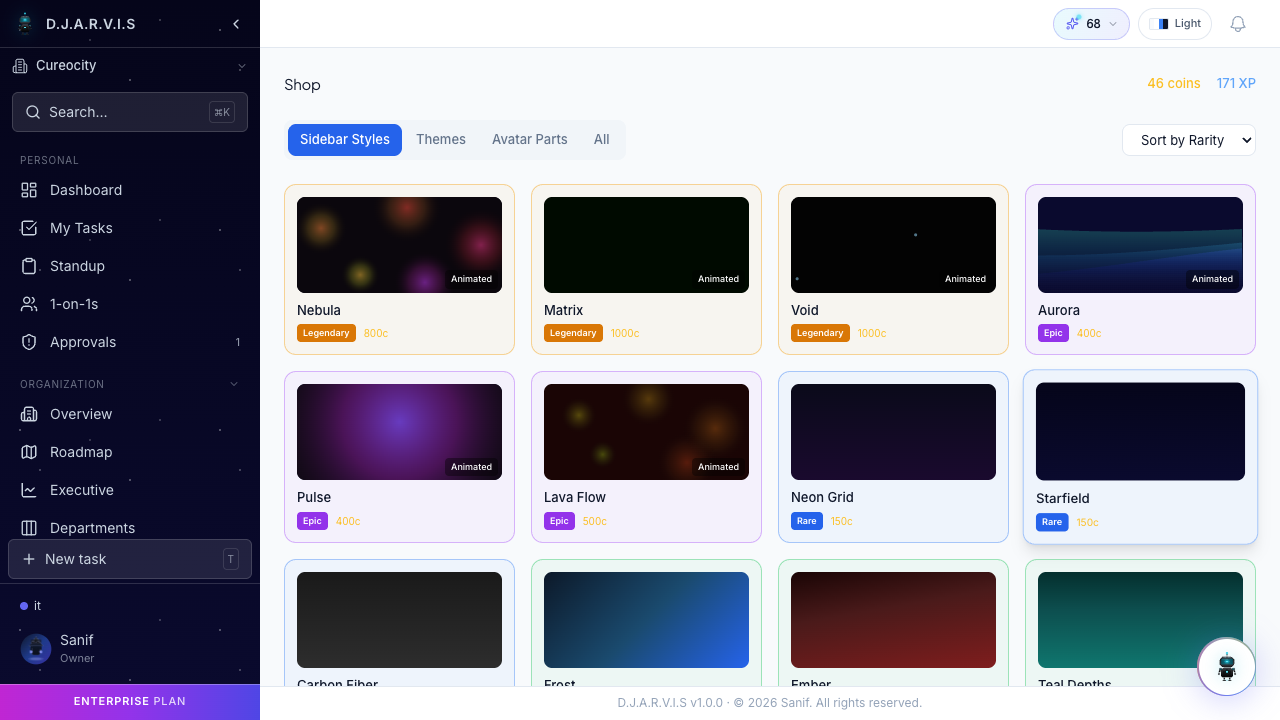
Browsing the shop
Open the shop from Rewards > Shop in the sidebar. Your coin balance and XP are shown at the top of the page. Items are displayed as visual cards showing a preview, name, rarity badge, and price.
You can filter items by category using the tabs at the top:
- Sidebar Styles — animated gradient themes that change the look of your sidebar.
- Themes — board and UI themes that change the visual feel of the app.
- Avatar Parts — decorative items for your profile avatar.
- All — browse every item in the shop at once.
Use the Sort by Rarity dropdown to sort items from rarest to most common, or vice versa.
Rarity tiers
Every shop item has a rarity tier that determines its exclusivity and price:
- Legendary — the rarest and most visually striking items, with animated effects and premium designs. Examples: Nebula, Matrix, Void sidebar styles.
- Epic — high-quality items with animated previews. Examples: Pulse, Lava Flow, Neon Grid.
- Rare — solid items with polished designs. Examples: Aurora, Starfield.
Higher rarity items cost more coins, so save up for the ones you want.
Available item types
Sidebar styles
Custom animated gradients that transform your sidebar into a unique visual experience. Each style has a distinct color palette and animation. Once purchased, activate it from your profile settings.
Themes
Board and UI themes that change the overall look of Takonaut, including background colors, card styling, and accent colors.
Avatar parts
Decorative elements for your profile avatar — frames, accessories, and other visual customizations displayed across the app.
Purchasing
- Click on an item card to view its details and preview.
- Confirm the purchase by clicking Buy.
- The cost is deducted from your coin balance immediately.
If you do not have enough coins, the buy button shows how many more coins you need.
Coin balance
Your current coin balance is displayed at the top-right of the shop page alongside your XP. You earn coins by:
- Completing tasks and sprints.
- Finishing quests.
- Receiving appreciation from teammates.
- Earning bounties set by delivery managers.
- Manager coin grants.
Check your full earning and spending history in the Wallet section under your profile.