Roadmap
The roadmap gives leadership and stakeholders a high-level view of strategic initiatives across the entire organization. It pulls together pinned epics from every project into a single timeline, making it easy to see what’s in flight, what’s coming up, and how everything connects.
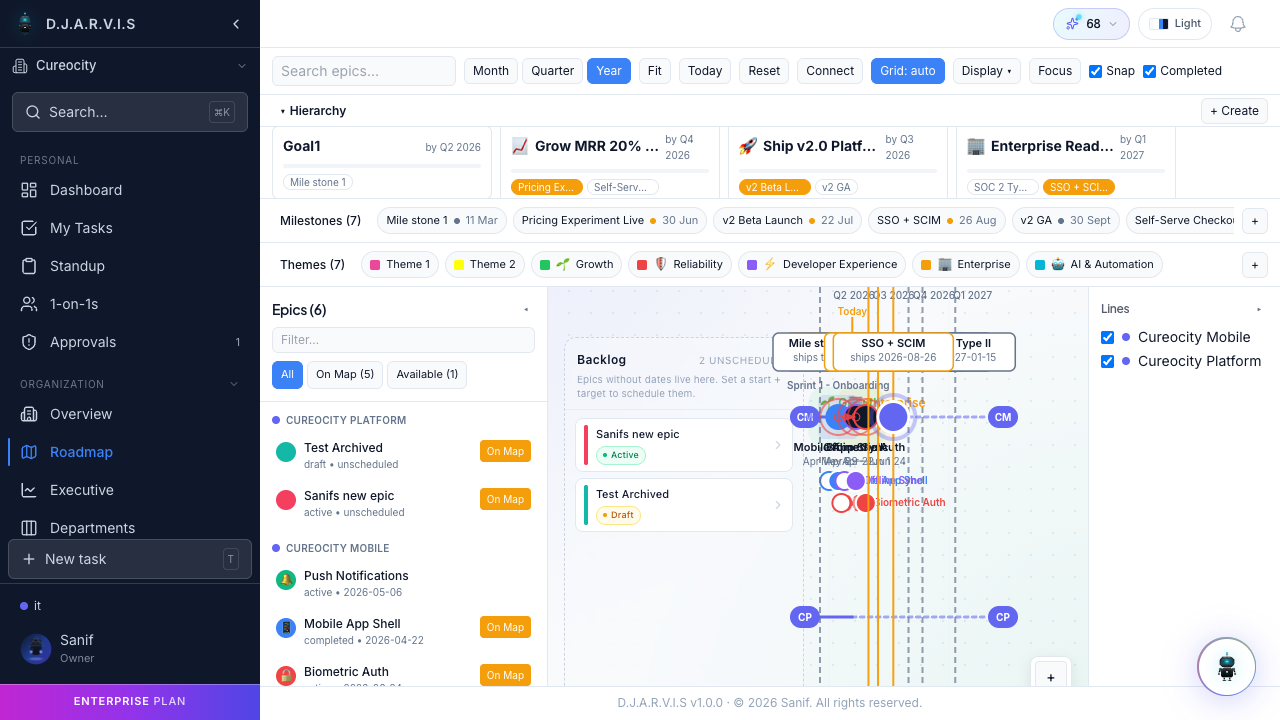
Organization Roadmap
The organization roadmap is accessible from the Roadmap link in the sidebar under the Organization section. It shows all epics that have been pinned to the roadmap, regardless of which project they belong to.
This is the view designed for leadership, product managers, and anyone who needs to understand the big picture without getting into task-level details. Each epic on the roadmap displays:
- Epic name and the project it belongs to.
- Date range — planned start and end dates shown as a bar on the timeline.
- Progress — a completion percentage based on the epic’s linked tasks.
- Status — the current lifecycle stage (To Do, In Progress, Done).
Timeline View
The roadmap renders epics as horizontal bars on a timeline. Each bar spans from the epic’s start date to its end date, giving you an intuitive sense of:
- Duration — how long each initiative is expected to take.
- Overlap — which initiatives run in parallel.
- Sequencing — which initiatives start after others finish.
- Gaps — periods where no major initiatives are planned.
You can scroll the timeline horizontally to look ahead or review past quarters. The current date is marked with a vertical line so you can see where things stand today.
Pinning Epics
Only pinned epics appear on the organization roadmap. To pin an epic:
- Navigate to the epic’s detail page within its project.
- Click Pin to Roadmap.
The epic immediately appears on the organization roadmap. This is a deliberate action — not every epic needs to be on the roadmap. Pin the ones that represent strategic priorities or cross-team initiatives that stakeholders care about.
To remove an epic from the roadmap, open it and click Unpin from Roadmap. The epic continues to exist in its project; it just won’t show on the organization-level view.
Org Goals
The roadmap also displays organization goals — high-level strategic objectives that provide context for why certain epics exist. Goals appear alongside the timeline and can include:
- Goal title — a short description of the objective.
- Target date — when the organization aims to achieve the goal.
- Progress — how close the goal is to completion.
Goals tie the tactical work (epics and tasks) to the strategic direction of the organization, helping teams understand how their work contributes to the bigger picture.
Progress Tracking
Each epic on the roadmap shows a completion percentage derived from its linked tasks. As tasks within an epic are completed, the percentage and progress bar update in real time.
This lets stakeholders quickly scan the roadmap and identify:
- Initiatives that are on track.
- Initiatives that are falling behind (low progress with an approaching end date).
- Completed initiatives that can be celebrated and unpinned.
No manual status updates are needed — progress is always based on actual task completion.
Filtering
The roadmap can be filtered to focus on what matters to you:
- By project — show only epics from a specific project. Useful when a project lead wants to see their initiatives in the context of the broader roadmap.
- By team — show epics related to a particular team’s work.
Filters narrow the timeline view without hiding the overall structure. Clear the filters to return to the full organization view.
Project-Level Roadmap vs Organization Roadmap
Takonaut has two levels of roadmap:
| Level | Scope | What it shows |
|---|---|---|
| Project roadmap | Single project | All epics in the project, whether pinned or not. Useful for project leads tracking their own initiatives. |
| Organization roadmap | Entire organization | Only pinned epics, pulled from all projects. Designed for leadership and cross-team visibility. |
The project roadmap lives within each project’s section in the sidebar. The organization roadmap is in the Organization section. Both use the same timeline format, but the organization roadmap is curated — only epics explicitly pinned by project leads or admins appear there.
This two-tier approach keeps the organization roadmap focused on strategic priorities while letting individual projects track all their epics without cluttering the top-level view.